This is the complete FQDN workflow: a connected desktop resolves one private hostname through the selected private DNS resolver, then reaches only the protocol and port allowed by its access rule.
The working path is:
managed desktop └─ WireGuard tunnel └─ assigned Tunnex gateway └─ active hub path, when the resolver uses another gateway └─ resolver-selected gateway ├─ private DNS resolver on UDP/TCP 53 └─ resolved workload on the allowed portTunnex coordinates, routes, and enforces this path. It does not provide a vendor-hosted relay, host DNS, discover a cloud account, or create a private DNS zone for you. In a one-gateway deployment, the assigned, hub, and resolver-selected gateway are the same machine.
What success looks like
Section titled “What success looks like”Do not call the setup complete from one green badge. Prove all of these:
| Layer | Required evidence |
|---|---|
| Private DNS | Direct UDP and TCP queries from the gateway return the intended address. |
| Resolver generation | The FQDN resource is healthy, has a current generation, and reports at least one active answer. |
| Policy | The intended FQDN rule is active; an unauthorized source or port remains denied. |
| Client DNS | The operating system has a suffix-scoped resolver and resolves the name without specifying a DNS server. |
| Routing | Both the resolver and resolved private address use the Tunnex interface. |
| Application | A real request succeeds on the allowed port. |
The verified Azure walk used throughout this guide resolves
dev.internal.tunnex.io to 172.16.0.4 through the Azure DNS Private Resolver
inbound endpoint 172.16.2.4, then reaches Nginx on TCP 80.
1. Plan the path before clicking
Section titled “1. Plan the path before clicking”Record the exact values for your deployment. Do not start with a wildcard or a whole VNet.
| Input | Example used here | Why it matters |
|---|---|---|
| Exact hostname | dev.internal.tunnex.io | One FQDN resource represents one exact hostname. |
| Private zone suffix | internal.tunnex.io | Selects the most-specific matching resolver profile. |
| Resolver endpoint | 172.16.2.4 | Must be a literal IP reachable through the selected gateway. |
| Resolver transport | UDP 53 profile entry | Desktop projection selects a reachable UDP 53 endpoint; that same DNS server must also accept TCP 53. |
| Workload address | 172.16.0.4 | Must sit inside an approved route for split-tunnel clients. |
| Application scope | TCP 80 | Be narrower than “any protocol, all ports.” |
| Site | Azure West US 2 Dev | Owns the routed ranges and resolver path. |
| Gateway | azure-westus2-gateway | Performs DNS resolution and enforces the compiled policy. |
| Allowed source | A named people group | Identifies who may initiate the connection. |
Use a private subdomain you control. Keep its zone private; publishing an RFC1918 A record in public DNS is not a substitute for private DNS.
Required state
Section titled “Required state”Before configuring FQDN access, confirm:
- your organization has the
fqdn_resourcesentitlement; - you are a verified-email owner or administrator with FQDN resource management permission;
- the gateway is active and healthy;
- the site contains approved routes for the resolver subnet and every private answer the hostname may return;
- the workload and resolver subnets return the Tunnex device pool through the gateway;
- the private DNS zone contains the exact record; and
- policy enforcement is enabled or scheduled for a controlled change window.
For the full Azure infrastructure build—VNet, dedicated gateway, private VM, return UDR, private zone, and resolver inbound endpoint—follow Azure gateway to a private VM.
2. Prove IP routing first
Section titled “2. Prove IP routing first”FQDN policy cannot repair a missing route. From the gateway, prove the private service by IP before adding DNS:
export APP_PRIVATE_IP="172.16.0.4" # Replace with your workload address.curl --fail --show-error --max-time 10 "http://${APP_PRIVATE_IP}/"Expected result: the application returns its known marker or expected status. Independently inspect the service log and the gateway’s route table. If the IP request fails, stop and repair site approval, forwarding, cloud firewall, and the device-pool return route.
Open Gateways → your gateway → Health. Connectivity and Policy and transit must be current and healthy.
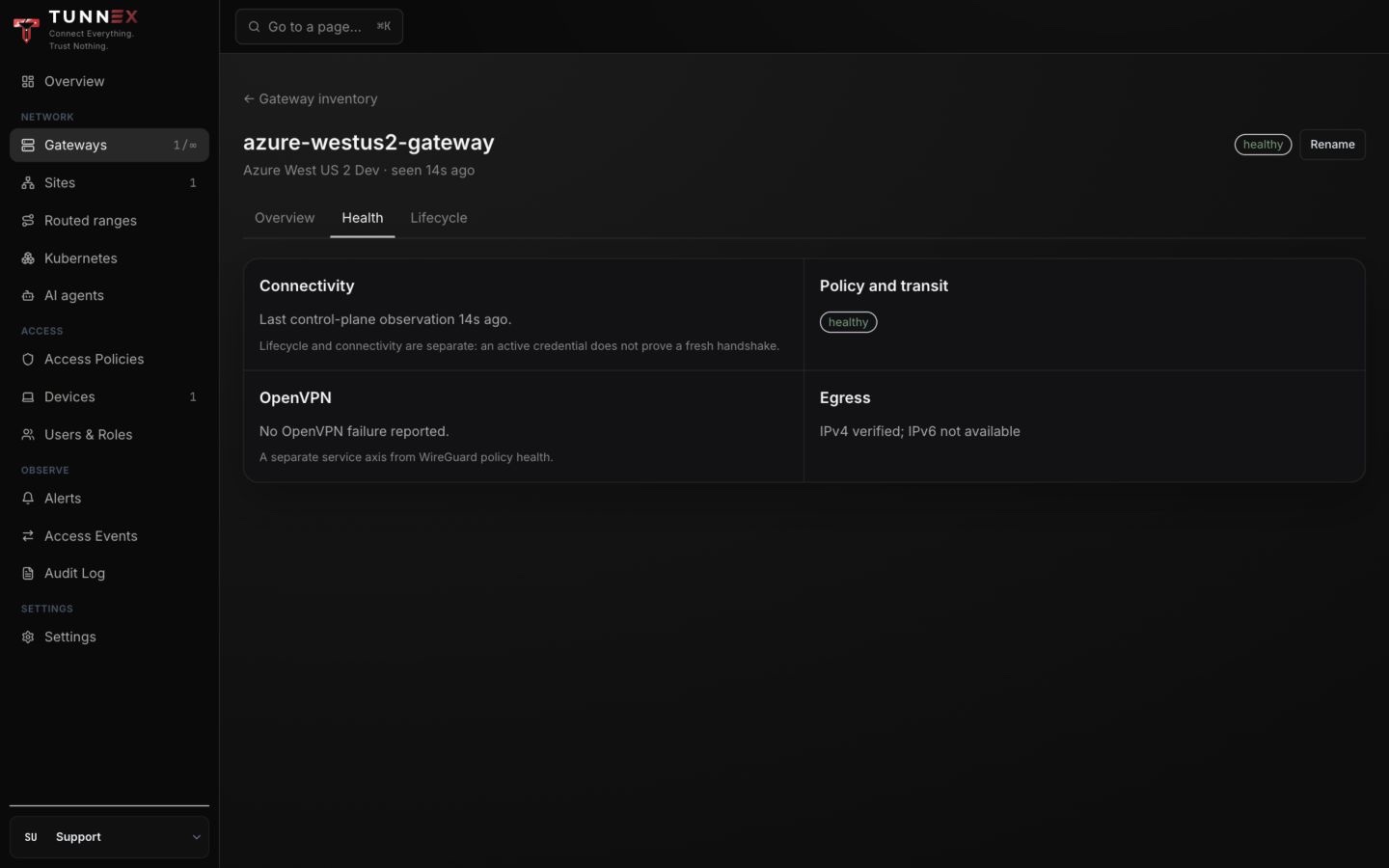
Expected result: the gateway reports a recent control-plane observation and
healthy policy/transit state. Independently run sudo wg show on the gateway
and confirm a recent handshake when the test client is connected.
3. Prove the authoritative resolver from the gateway
Section titled “3. Prove the authoritative resolver from the gateway”Query the resolver directly over both transports. This isolates cloud DNS from desktop projection and policy.
export PRIVATE_RESOLVER_IP="172.16.2.4" # Replace with your endpoint.export PRIVATE_HOSTNAME="dev.internal.tunnex.io"
dig +short @"$PRIVATE_RESOLVER_IP" "$PRIVATE_HOSTNAME" Adig +tcp +short @"$PRIVATE_RESOLVER_IP" "$PRIVATE_HOSTNAME" A
Both commands must return the expected workload address. If one fails, fix the DNS record, endpoint listener, security group/NSG, route, or return path before continuing.
On Azure, use an Azure DNS Private Resolver inbound endpoint. The VNet-local
Azure resolver address is not directly usable by a remote Tunnex device. The
inbound endpoint subnet must be dedicated to
Microsoft.Network/dnsResolvers, advertised through Tunnex, and associated
with the device-pool return UDR.
4. Activate a private DNS resolver profile
Section titled “4. Activate a private DNS resolver profile”- Open Access Policies → Resources.
- Select FQDN.
- Under Private DNS resolvers, choose the intended Site and Gateway.
- For a new path, select Configure profiles; the modal is titled Configure private DNS profiles. For an existing path, select Edit profiles; the modal is titled Activate new DNS profile version.
- Enter a stable profile name and select the provider. Provider selection is descriptive; it does not connect Tunnex to the cloud account.
- Enter one or more comma-separated zone suffixes without
*.. - For the golden path, add one literal resolver IP on UDP
53. Independently prove that the same DNS server also accepts TCP53for truncated-response fallback. - Review the displayed resolver path and select Activate profiles.
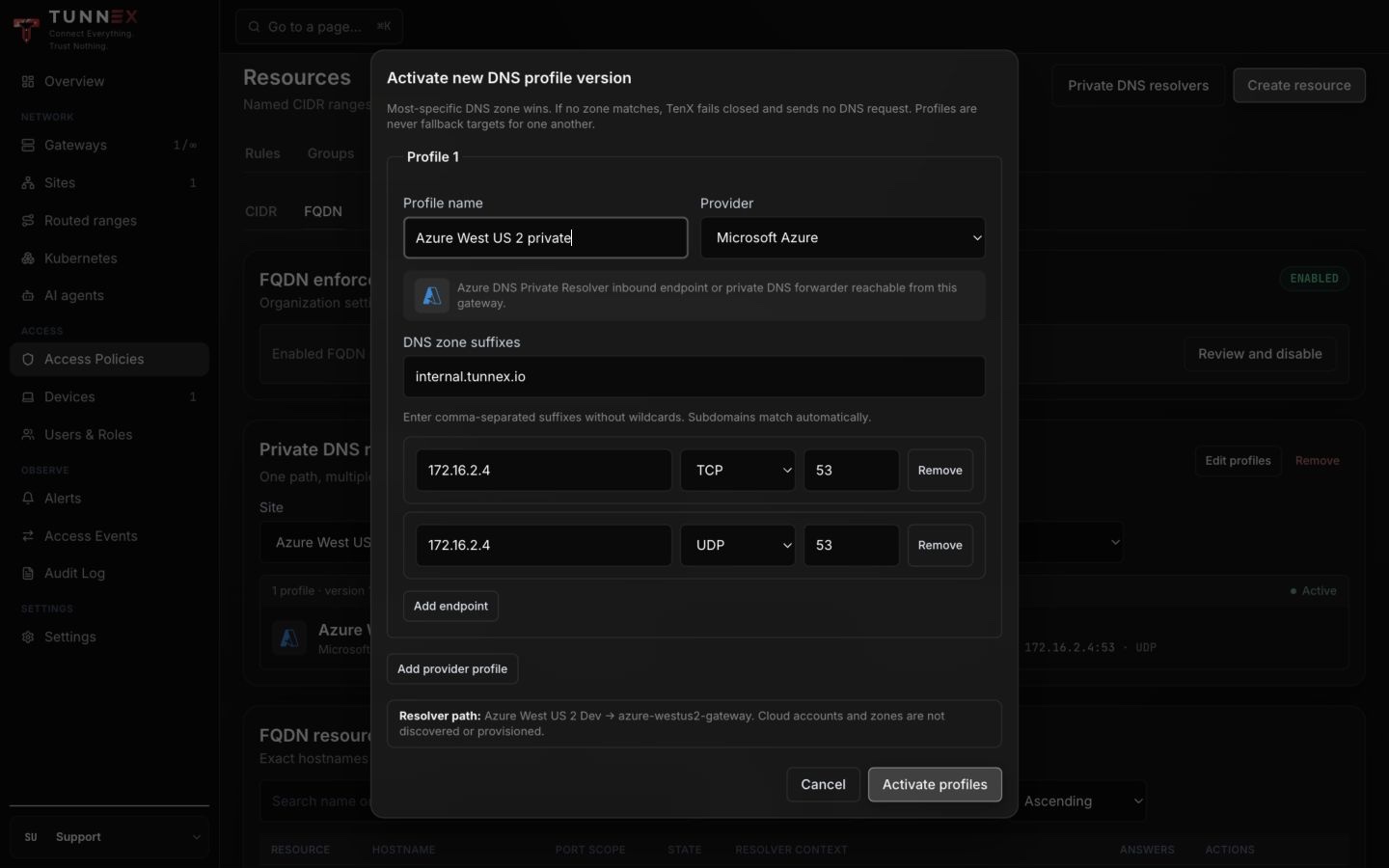
The live-walk screenshot shows the same Azure endpoint entered once for UDP and once for TCP. That is a stricter two-member resolver consensus: both configured queries must succeed and return the same canonical answer set. The entries are not primary/fallback targets.
Expected result: the selected Site/Gateway row reports Active, a new
version, and the intended suffix/endpoints. Independently repeat the gateway
UDP and TCP dig tests; activating a profile does not prove the endpoint works.
Resolver matching is deliberately strict:
- the most-specific boundary suffix wins;
- profiles and endpoints are not fallback targets for one another;
- duplicate ownership of the same suffix is ambiguous and fails closed;
- an unmatched hostname sends no resolver request; and
- changing profiles creates a new version instead of rewriting history.
Every configured endpoint/transport is an authoritative consensus member. A
timeout, lookup failure, or answer disagreement withdraws the result; TTL-only
differences use the minimum TTL. The current service accepts up to eight
endpoints per profile and follows CNAME chains to a bounded depth. For a
managed desktop, provide at least one reachable literal UDP 53 endpoint; a
TCP-only or non-53 profile can support server-side resolution but cannot be
projected as the desktop’s native scoped resolver.
5. Create the exact-hostname resource
Section titled “5. Create the exact-hostname resource”- Stay on Access Policies → Resources → FQDN.
- Select Create resource, then Create FQDN resource.
- Enter a stable Name and the one Exact hostname.
- Choose Protocol and the narrowest port scope the application needs.
- Choose the intended Site and Gateway.
- Confirm that the correct resolver is selected automatically, including its matching suffix, active version, and endpoint count.
- Select Create resource.
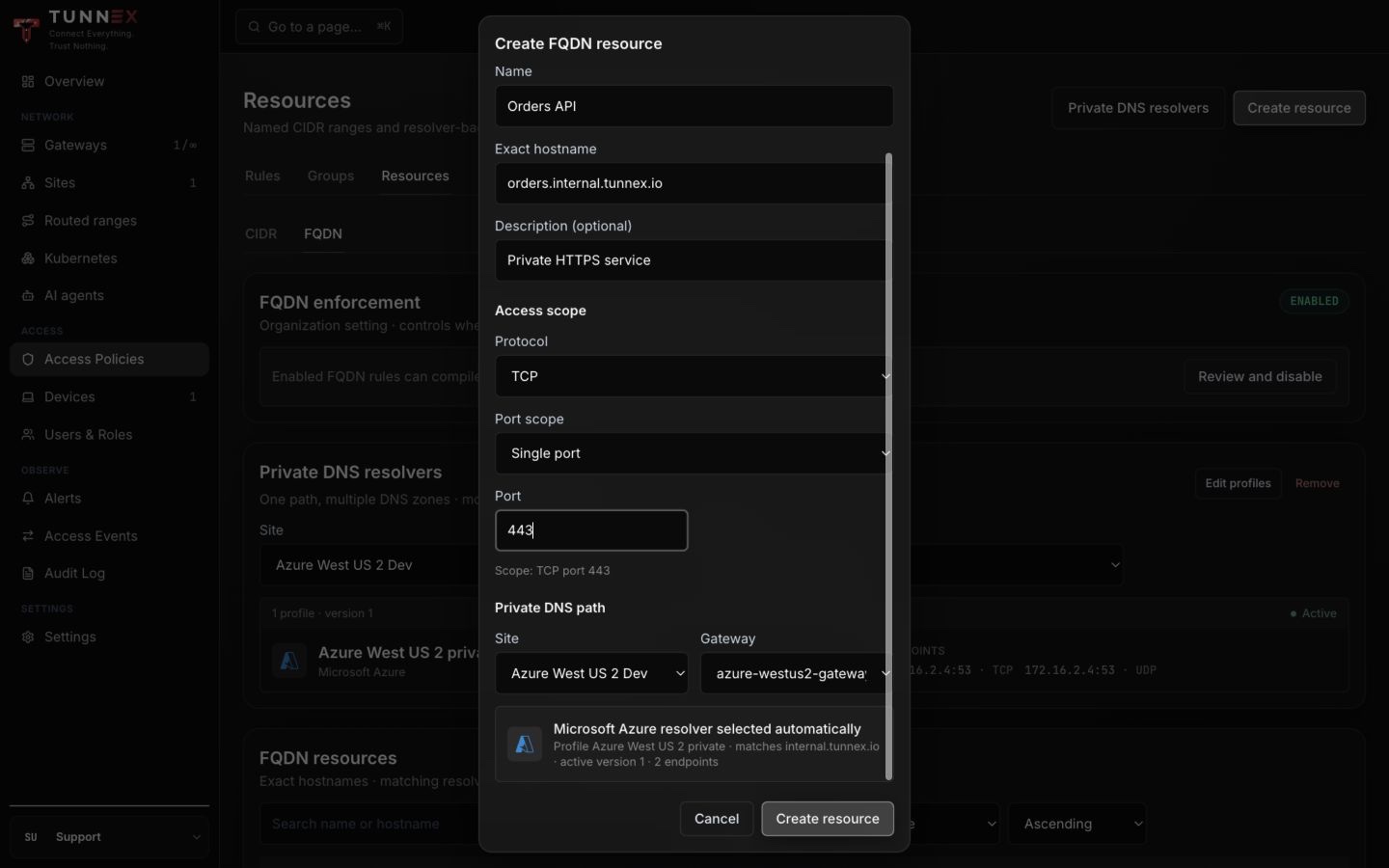
The screenshot stages a second example to show every field; the verified live
resource below is Dev Nginx, dev.internal.tunnex.io, TCP 80.
Expected result: the resource enters resolving, then becomes healthy with an active generation and answer count. Independently query the resolver from the gateway and compare the returned address with the resource detail.
Do not create a manual CIDR resource for the resolver and do not add separate
user-facing UDP/TCP 53 rules. When an eligible FQDN access rule compiles,
Tunnex derives the required resolver carriage from its selected profile and
keeps it bound to the parent rule’s lifecycle. These are compiler grants, not
extra resources or child rules shown in the console.
6. Wait for a healthy generation
Section titled “6. Wait for a healthy generation”Open the resource row after it becomes healthy.
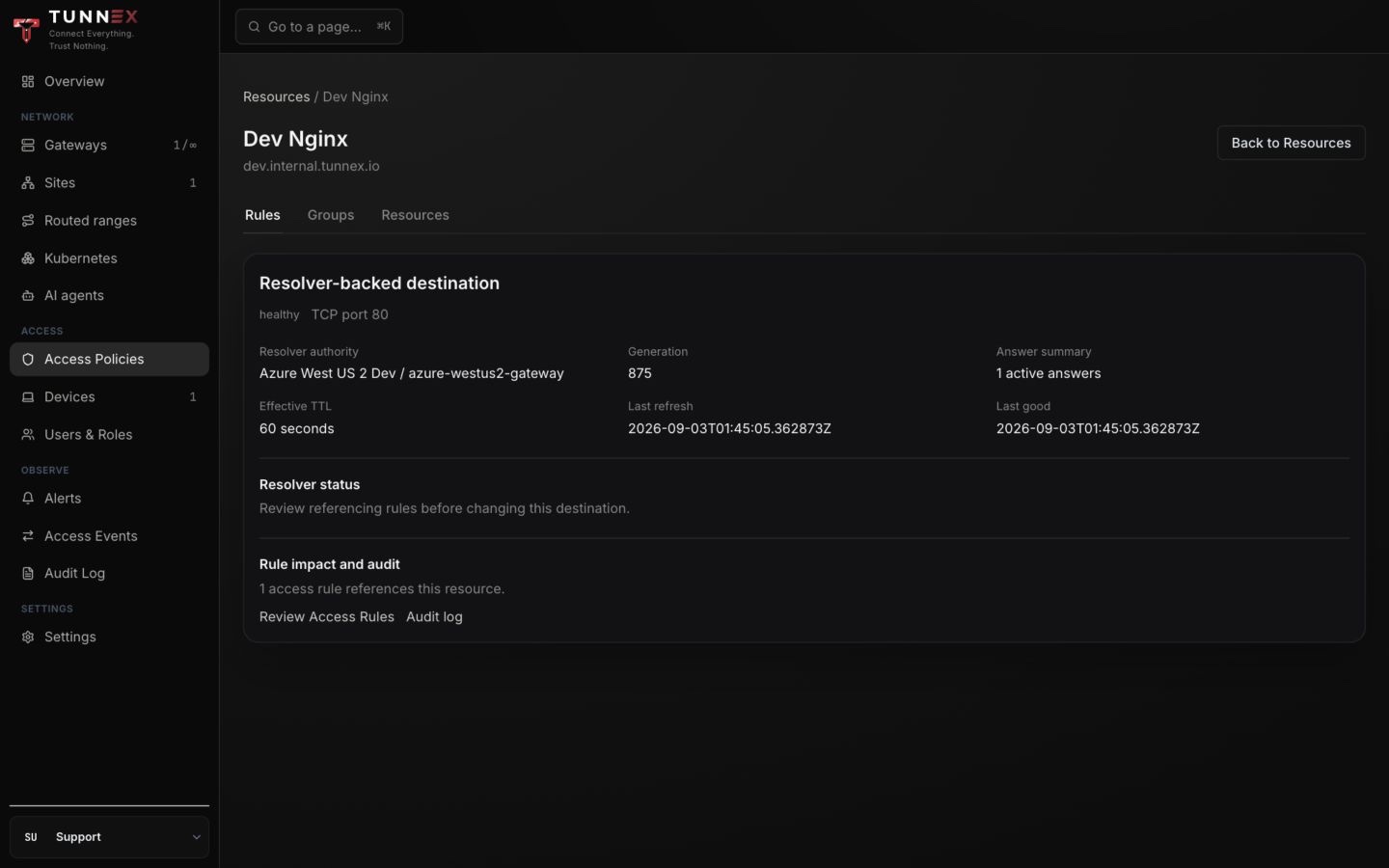
Expected result: the detail page names the resolver authority and shows a current generation, active-answer count, effective TTL, last refresh, last good time, and referencing-rule count. It does not display the answer IPs. Independently compare a direct gateway query with the known workload address. Refresh the page while waiting; the current resource view does not poll from resolving to healthy.
Understand the states
Section titled “Understand the states”| State | Meaning | Operator action |
|---|---|---|
draft | No resolver path is bound. | Edit the resource and select a Site/Gateway with a matching active profile. |
unconfigured | The selected path has no usable profile for this hostname. | Correct suffix ownership or activate the profile. |
resolving | The gateway has not yet reported a usable current result. | Wait briefly, then inspect endpoint reachability and gateway logs. |
healthy | A current active generation exists. | Continue to policy and client proof. |
failed | Resolution failed and no active generation exists. | Inspect the gateway, endpoint consensus, and failure reason in logs. |
nxdomain | The authoritative resolver reports the name does not exist. | Correct or restore the exact private record. |
stale | Prior data is diagnostic only and authorizes no traffic. | Repair DNS or the gateway path; do not rely on last-good answers. |
Answers are capped, TTLs are bounded, and refresh occurs before expiry. A lookup failure, NXDOMAIN, SERVFAIL, timeout, inconsistent resolver answers, or answer overflow withdraws the active generation rather than authorizing stale data. IPv4 and IPv6 families are validated independently: a prohibited answer drops that family, while a valid sibling family may still publish. Last-good data can remain visible briefly for diagnosis but is never an authorization source.
7. Add the FQDN access rule
Section titled “7. Add the FQDN access rule”- Open Access Policies → Rules and select Add rule.
- For managed desktop DNS, choose a person, people group, managed agent, or managed-agent group that matches the device. A Site or source CIDR rule does not project a per-desktop resolver.
- For the destination, choose FQDN resource, then select the resource you just created.
- Read the generated Access granted sentence.
- Add an expiry for temporary access, or leave it empty for a reviewed standing grant.
- Select Create.
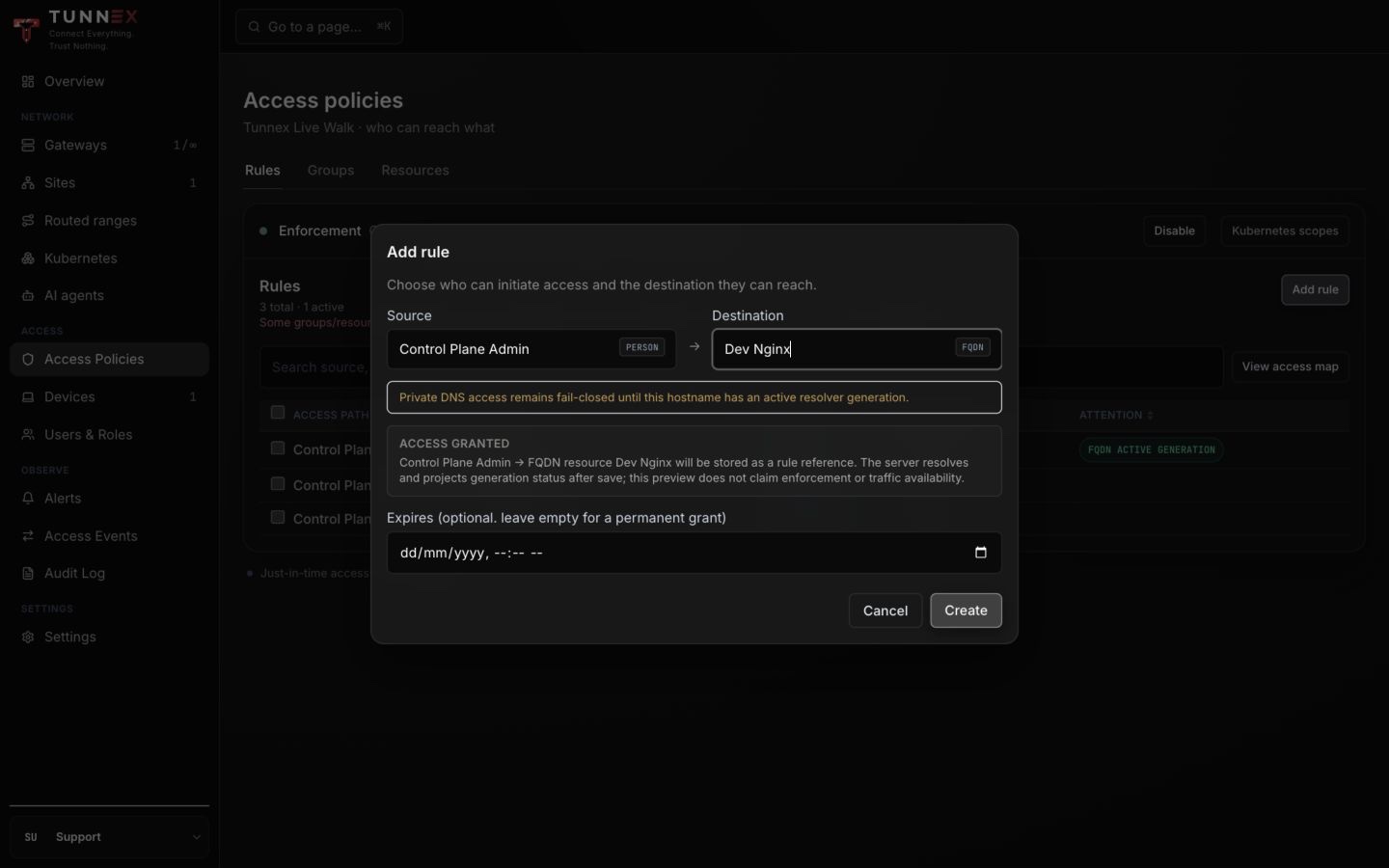
Expected result before enforcement: the rule is enabled, while its attention badge explains that FQDN opt-in or generation state still prevents traffic. After both gates are enabled, the authoritative badge text is FQDN ACTIVE GENERATION. Prove the real desktop traffic and negative control; an Active row by itself means only that the rule is enabled.
When the rule is eligible, the gateway policy contains exact /32 IPv4 or
/128 IPv6 destinations for the current answers, scoped to the resource’s
protocol and ports. Tunnex does not broaden the answer to a subnet.
8. Enable both enforcement gates
Section titled “8. Enable both enforcement gates”Use the policy rollout change window to enable global default-deny only after ordinary CIDR/site rules and negative tests are ready. The Enforcement banner on Access Policies → Rules must report On.
Then enable the separate organization FQDN opt-in:
- On Access Policies → Resources → FQDN, find FQDN enforcement.
- Select Review and enable.
- Wait for the server impact preview. Confirm that the entitlement is available and review the enforcement-ready rule count and IDs.
- Select Enable FQDN enforcement.
The browser sends the server-issued impact token when it confirms the change; do not bypass this safety flow with a database edit.
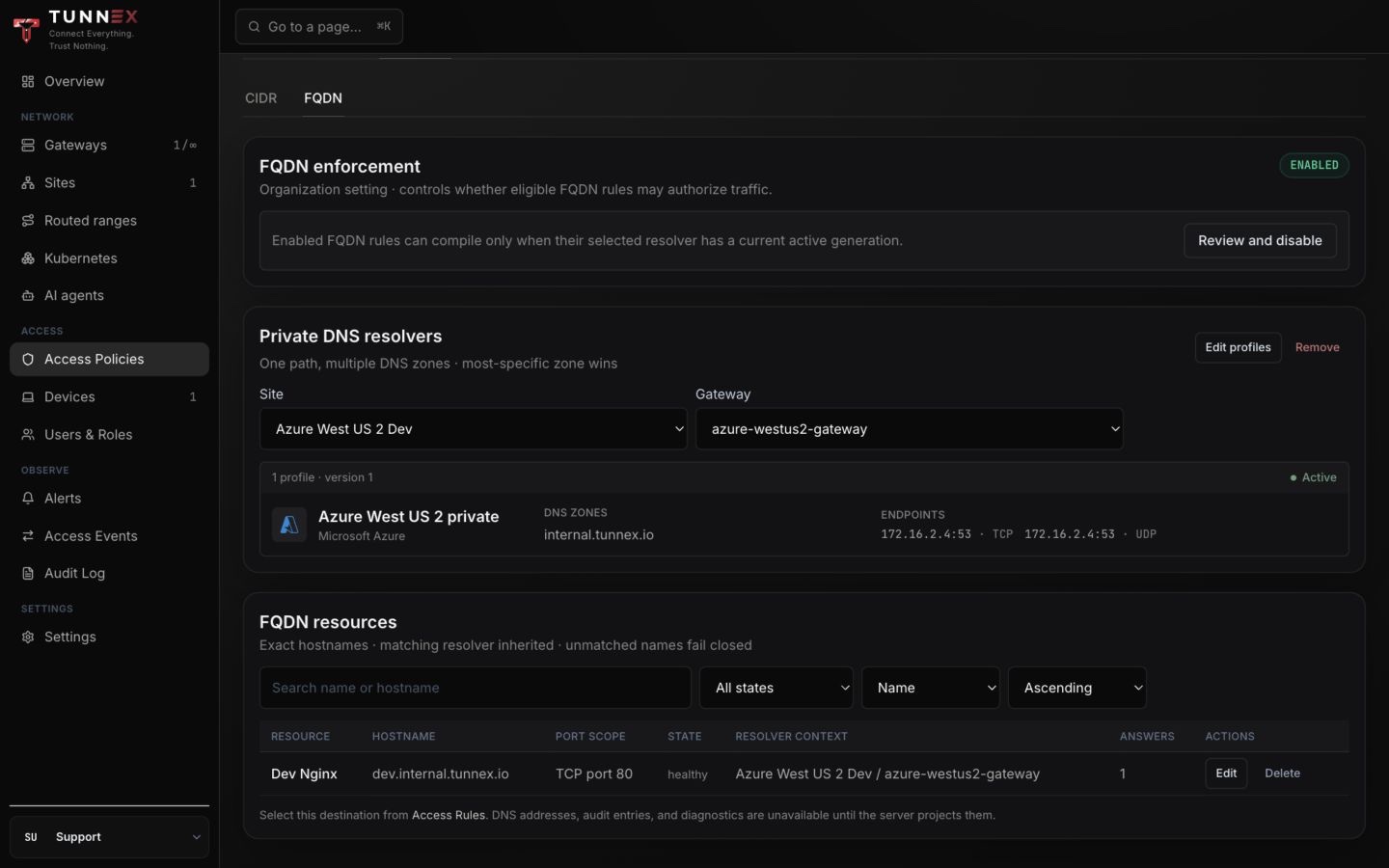
Expected result: the FQDN card reports ENABLED and the rule attention badge reports an active FQDN generation. Independently verify the organization-setting change in Audit Log, then wait for the gateway to apply the new policy revision before testing traffic.
Disabling global enforcement opens the mesh according to that broader mode; disabling only the FQDN setting withdraws FQDN authorization organization-wide. Resolver profiles, resources, and history remain visible, but FQDN rules carry no traffic until their dedicated setting is enabled again.
9. Connect a managed desktop
Section titled “9. Connect a managed desktop”Use Tunnex Desktop v0.1.1 or later. The automatic DNS
steps in this guide do not apply to a static WireGuard import or the current
Linux CLI profile.
- In Profiles, select Tunnex account, not an imported
.conffile. - In Settings → Routing, choose Only Tunnex routes for split tunnel or the reviewed full-tunnel mode.
- Disconnect before changing that setting, then reconnect.
- Wait for Connected, but do not stop at the label.
The managed client periodically receives routes and DNS forwards. It installs the suffix rule through its privileged helper and removes Tunnex-owned entries on a clean disconnect. If applying a resolver fails, the current connection fails static: the tunnel remains up, but the new DNS forward is not silently claimed as installed.
10. Prove the complete path on macOS
Section titled “10. Prove the complete path on macOS”Use the system resolver for the end-to-end lookup. A direct dig @server
proves only the DNS endpoint; plain dig does not reliably exercise macOS
supplemental resolver selection.
export PRIVATE_ZONE="internal.tunnex.io"export PRIVATE_HOSTNAME="dev.internal.tunnex.io"export PRIVATE_RESOLVER_IP="172.16.2.4"export APP_PRIVATE_IP="172.16.0.4"
# Tunnex owns one readable scoped resolver file for this suffix.sudo ls -l "/etc/resolver/${PRIVATE_ZONE}"sudo cat "/etc/resolver/${PRIVATE_ZONE}"
# macOS has loaded the suffix-scoped resolver.scutil --dns | grep -A 8 -B 2 "$PRIVATE_ZONE"
# The native system resolver returns the private address.dscacheutil -q host -a name "$PRIVATE_HOSTNAME"
# Both destinations use the Tunnex tunnel.route -n get "$PRIVATE_RESOLVER_IP"route -n get "$APP_PRIVATE_IP"
# The allowed application request succeeds by hostname.curl --fail --show-error --max-time 10 \  -o /dev/null -w 'status=%{http_code} remote_ip=%{remote_ip}\n' \  "http://${PRIVATE_HOSTNAME}/"
Expected live-walk evidence:
-rw-r--r-- ... /etc/resolver/internal.tunnex.io# tunnex-managednameserver 172.16.2.4
name: dev.internal.tunnex.ioip_address: 172.16.0.4
interface: utun...status=200 remote_ip=172.16.0.4
The resolver file must be mode 0644 so macOS services can read it. If an
older client recreates it as 0600, upgrade to Desktop v0.1.1 or later and
reconnect; do not make a recurring chmod workaround part of the deployment.
11. Prove the complete path on Windows
Section titled “11. Prove the complete path on Windows”Open PowerShell as the connected user:
$PrivateZone = 'internal.tunnex.io'$PrivateHostname = 'dev.internal.tunnex.io'$AppPrivateIp = '172.16.0.4'
# The effective Name Resolution Policy Table contains the Tunnex suffix.Get-DnsClientNrptPolicy -Effective |  Where-Object Namespace -EQ ".$PrivateZone" |  Format-List Namespace,NameServers
# Windows resolves through the suffix rule.Resolve-DnsName $PrivateHostname -Type A
# The intended port is reachable and HTTP names the private peer.Test-NetConnection $PrivateHostname -Port 80curl.exe --fail --show-error --max-time 10 `  -o NUL -w "status=%{http_code} remote_ip=%{remote_ip}`n" `  "http://$PrivateHostname/"
Expected result: the effective NRPT rule maps the zone to the private resolver,
Resolve-DnsName returns the workload IP, TcpTestSucceeded is True, and
the HTTP request returns the intended status. Disconnect and confirm the
Tunnex-owned NRPT rule is removed.
12. Prove default deny
Section titled “12. Prove default deny”A successful allowed request is half the security proof. Test at least one nearby path that must stay denied:
- the same hostname on an ungranted port;
- the same resource from a user outside the source group; or
- a sibling hostname with no FQDN resource/rule and a different answer.
Expected result: the allowed request succeeds and the negative control does not. Review Access Events and gateway counters to distinguish policy denial from DNS or routing failure.
FQDN policy is destination IP, protocol, and port enforcement after DNS resolution. It is not HTTP Host-header or TLS SNI isolation. If two services share the same answer and port, the network layer cannot distinguish them; separate them by address/port or add application-layer authorization.
13. Troubleshoot in order
Section titled “13. Troubleshoot in order”| Observation | What it proves | Next check |
|---|---|---|
| Gateway direct UDP and TCP queries both fail | Nothing beyond endpoint reachability failed. | Private record, inbound endpoint, firewall/NSG, approved resolver route, and return UDR. |
Direct queries work; resource stays resolving | Cloud DNS works, but server/gateway projection does not. | Selected Site/Gateway, profile suffix, gateway version/logs, and endpoint consensus. |
| Resource is healthy; no scoped resolver appears | Server resolution works, but desktop DNS projection is absent. | Managed profile, Desktop v0.1.1+, UDP 53 endpoint, client logs, and reconnect. |
| System lookup works; route uses normal interface | DNS is correct, split-tunnel routing is not. | Approved route containing the returned answer and refreshed managed routes. |
| Name and route work; application times out | DNS and client routing work. | Active FQDN rule, exact port/protocol, gateway policy, workload firewall, listener, and return path. |
| Allowed request works from everyone | Data path works, source policy is too broad or enforcement is off. | Global enforcement, rule source, group membership, and compiled policy. |
| It worked, then immediately stopped after DNS failure | Fail-closed withdrawal is operating. | Authoritative DNS health; do not re-enable with a broad CIDR rule. |
Useful gateway checks:
sudo wg showip route get 172.16.2.4dig +short @172.16.2.4 dev.internal.tunnex.io Adig +tcp +short @172.16.2.4 dev.internal.tunnex.io Asudo journalctl -u tunnex-node --since '15 minutes ago' --no-pagerIf the agent runs in Docker, use its container logs instead of assuming a systemd service name.
Current boundaries
Section titled “Current boundaries”- FQDN resources accept exact hostnames; wildcard resources are not supported.
- A resource is bound to one selected Site/Gateway resolver context.
- Tunnex does not create cloud private zones, records, inbound endpoints, routes, NSGs/security groups, or return UDRs.
- Resolver endpoints are literal IPs; hostname endpoints are not accepted.
- Profiles are suffix selectors, not ordered failover chains. Conflicting or inconsistent answers fail closed.
- If rules matching one desktop produce the same suffix with different resolver IPs, Tunnex withholds that suffix forward rather than guessing.
- Managed desktop projection currently requires a reachable UDP
53endpoint. - Static WireGuard imports and the current Linux CLI do not receive managed suffix-scoped DNS lifecycle.
- Split-tunnel access works only when the resolver and every returned private address are inside approved routed ranges.
- A healthy resource proves current DNS state, not policy, client setup, application health, or the cloud return route.
- FQDN rules enforce network destinations; they do not authenticate the application or distinguish virtual hosts sharing an IP and port.
Change and rollback safely
Section titled “Change and rollback safely”For a low-disruption DNS cutover, lower the authoritative TTL in advance, verify the new service by IP, publish old and new answers together, and wait for a healthy generation containing both. Move and verify client traffic, then remove the old answer after the cache window. Replacing old with new in one step withdraws the old exact route immediately and may flush matching connections; leaving the old service running does not keep that address authorized. Account for the 30-second effective TTL floor.
To withdraw access:
- disable or delete the FQDN rule;
- confirm the gateway applied the new policy and the client request fails;
- retain a resource that has ever produced an immutable answer generation as history; only a never-resolved draft with no generation history can be deleted;
- remove or replace the resolver profile only after reviewing every suffix it owns; and
- disable organization-wide FQDN enforcement only when you intend to withdraw all FQDN rules.
Keep the DNS zone and cloud routes until the withdrawal has been independently verified. Deleting infrastructure first converts a controlled policy change into an ambiguous outage.
Completion record
Section titled “Completion record”Record these items in the change ticket without secrets:
- control-plane and Desktop versions;
- organization, Site, and gateway names;
- exact hostname, resolver suffix, and application port;
- approved resolver and workload ranges;
- profile version and FQDN generation;
- allowed and denied test identities;
- timestamps for direct DNS, system DNS, route, application, and audit proofs; and
- rollback owner.
Never capture join tokens, device profiles, private keys, bearer tokens, passwords, or resolver credentials. The screenshots in this guide come from an isolated Azure validation environment and contain none of those values.