This walkthrough builds a dedicated Tunnex gateway in Azure and proves that a connected desktop device can reach Nginx on a VM with no public IP. It uses a separate gateway subnet and workload subnet so Azure can apply the return route only to workloads.
Read Plan your deployment first. This guide assumes the
control plane is already healthy at a stable public FQDN such as
https://vpn.example.com.
What this builds
Section titled “What this builds”| Component | Example value | Traffic it must accept |
|---|---|---|
| Control plane | vpn.example.com | HTTPS on TCP 443; raw gateway control on TCP 8443 |
| Azure VNet | 10.42.0.0/16 | Must not overlap any Tunnex or connected-network range |
| Gateway subnet | 10.42.0.0/24 | Dedicated to the routing VM in this walkthrough |
| Workload subnet | 10.42.10.0/24 | Contains the private Nginx VM |
| Gateway private IP | 10.42.0.4 | Azure UDR next hop |
| Gateway public IP | Azure Standard static IPv4 | WireGuard on UDP 51820 |
| Tunnex device pool | 10.99.0.0/24 | Example installation default; verify the live value before routing it |
The packet path is:
- The desktop client dials the gateway’s static public IP on UDP
51820. - The gateway forwards the request from the device pool to the workload VM.
- A UDR on the workload subnet sends replies for the device pool to the gateway’s private IP.
- The gateway returns the reply through WireGuard.
The control plane is not in the application data path. TCP 8443 is a raw,
mutually authenticated gateway-control service; it is not an HTTP route and
must not be placed behind an ordinary layer-7 proxy.
1. Check identity, location, and quota
Section titled “1. Check identity, location, and quota”Use Azure CLI in Bash. Select the intended subscription explicitly and keep the same shell open for the rest of the walkthrough.
az loginaz account list --query '[].{name:name,id:id,isDefault:isDefault}' -o tableexport AZURE_SUBSCRIPTION="replace-with-subscription-id-or-name"az account set --subscription "$AZURE_SUBSCRIPTION"
export SUBSCRIPTION_ID="$(az account show --query id -o tsv)"export LOCATION="eastus2"
az account show --query '{subscription:name,id:id,tenant:tenantId}' -o tableaz account list-locations \  --query "[?name=='${LOCATION}'].{name:name,displayName:displayName}" -o tableaz vm list-usage --location "$LOCATION" -o tableaz network list-usages --location "$LOCATION" -o tableaz vm list-skus --location "$LOCATION" --size Standard_B2s --all \  --query "[?name=='Standard_B2s'].{name:name,restrictions:restrictions}" -o jsonc
Confirm there is room for two Standard_B2s VMs and their vCPUs, two NICs, one
Standard public IPv4 address, one VNet, and one route table. A SKU result with a
non-empty location or zone restriction is not deployable as written; choose an
available size or location before creating resources.
Also verify the public control-plane endpoints from the current shell. Step 5 repeats the raw-control check from the gateway itself:
export CP_HOST="vpn.example.com"
getent ahosts "$CP_HOST"curl -fsS "https://${CP_HOST}/healthz"nc -vz "$CP_HOST" 8443
The HTTPS check and the TCP 8443 check prove different paths. Do not replace
the second check with curl; port 8443 is not an HTTP endpoint.
2. Freeze the address plan
Section titled “2. Freeze the address plan”Set names and example ranges. Replace ADMIN_CIDR with the public IPv4 /32
from which you will SSH. Azure will reject the documentation placeholder if you
forget to replace it.
export RG="tunnex-azure-walkthrough-rg"export VNET="tunnex-workload-vnet"export VNET_CIDR="10.42.0.0/16"export GW_SUBNET="tunnex-gateway-subnet"export GW_SUBNET_CIDR="10.42.0.0/24"export WORKLOAD_SUBNET="private-workload-subnet"export WORKLOAD_SUBNET_CIDR="10.42.10.0/24"export DNS_SUBNET="private-dns-resolver-inbound"export DNS_SUBNET_CIDR="10.42.20.0/28"
export GW_VM="tunnex-gateway-01"export GW_NIC="tunnex-gateway-01-nic"export GW_NSG="tunnex-gateway-01-nsg"export GW_PIP="tunnex-gateway-01-pip"export GW_PRIVATE_IP="10.42.0.4"
export APP_VM="dev-private-01"export APP_NIC="dev-private-01-nic"export APP_NSG="dev-private-01-nsg"
export DEVICE_POOL_CIDR="10.99.0.0/24"export RETURN_RT="tunnex-device-return-rt"export PRIVATE_ZONE="internal.example.com"export DNS_RESOLVER="tunnex-private-dns-resolver"export DNS_INBOUND="tunnex-private-dns-inbound"export ADMIN_USER="azureuser"export ADMIN_CIDR="replace-with-your-public-ipv4/32"
In the Tunnex console, open Routed ranges and Settings. Confirm the live
organization device pool, approved site ranges, pending ranges, and Kubernetes
ranges. Change DEVICE_POOL_CIDR to the live device-pool value if it is not
10.99.0.0/24.
Create a dedicated SSH key, or reuse it only when both halves already exist:
export SSH_KEY="$HOME/.ssh/tunnex-azure-walkthrough"export SSH_PUBLIC_KEY="${SSH_KEY}.pub"
if test -e "$SSH_KEY" || test -e "$SSH_PUBLIC_KEY"; then  test -f "$SSH_KEY" && test -f "$SSH_PUBLIC_KEY" || {    echo 'Only one key file exists; choose a new SSH_KEY path.' >&2    return 1 2>/dev/null || exit 1  }  echo "Reusing $SSH_PUBLIC_KEY"else  install -d -m 700 "$HOME/.ssh"  ssh-keygen -t ed25519 -a 64 -f "$SSH_KEY" -C "tunnex-azure-walkthrough"fichmod 600 "$SSH_KEY"chmod 644 "$SSH_PUBLIC_KEY"
Protect the private key with a passphrase. If either test fails, choose a new
path or intentionally reuse the existing public key; do not overwrite it.
3. Create the VNet and subnets
Section titled “3. Create the VNet and subnets”The resource group in this example contains only disposable walkthrough resources. Do not reuse the control plane’s resource group if you expect to use the one-command teardown later.
az group create --name "$RG" --location "$LOCATION" --output table
az network vnet create \  --resource-group "$RG" \  --location "$LOCATION" \  --name "$VNET" \  --address-prefixes "$VNET_CIDR" \  --subnet-name "$GW_SUBNET" \  --subnet-prefixes "$GW_SUBNET_CIDR" \  --output table
az network vnet subnet create \  --resource-group "$RG" \  --vnet-name "$VNET" \  --name "$WORKLOAD_SUBNET" \  --address-prefixes "$WORKLOAD_SUBNET_CIDR" \  --output table
az network vnet subnet list \  --resource-group "$RG" \  --vnet-name "$VNET" \  --query '[].{name:name,prefix:addressPrefix,routeTable:routeTable.id}' -o table
az network vnet check-ip-address \  --resource-group "$RG" \  --name "$VNET" \  --ip-address "$GW_PRIVATE_IP" \  --output jsonc
The address check must report available: true. Choose another fixed IP inside
the gateway subnet if it is already allocated.
For an existing VNet, inventory all peerings, VPN/ExpressRoute routes, subnet NSGs, and route-table associations before adapting this section. Do not replace or detach an existing route table without merging its required routes.
4. Create the gateway network resources
Section titled “4. Create the gateway network resources”Create a Standard static public IP, a gateway NSG, and a NIC with a fixed
private IP. UDP 51820 is public because devices must be able to dial it. SSH is
restricted to ADMIN_CIDR.
az network public-ip create \  --resource-group "$RG" \  --location "$LOCATION" \  --name "$GW_PIP" \  --version IPv4 \  --sku Standard \  --allocation-method Static \  --output table
az network nsg create \  --resource-group "$RG" \  --location "$LOCATION" \  --name "$GW_NSG" \  --output table
az network nsg rule create \  --resource-group "$RG" \  --nsg-name "$GW_NSG" \  --name AllowWireGuard51820 \  --priority 100 \  --direction Inbound \  --access Allow \  --protocol Udp \  --source-address-prefixes Internet \  --source-port-ranges '*' \  --destination-address-prefixes '*' \  --destination-port-ranges 51820 \  --output table
az network nsg rule create \  --resource-group "$RG" \  --nsg-name "$GW_NSG" \  --name AllowSshFromAdmin \  --priority 110 \  --direction Inbound \  --access Allow \  --protocol Tcp \  --source-address-prefixes "$ADMIN_CIDR" \  --source-port-ranges '*' \  --destination-address-prefixes '*' \  --destination-port-ranges 22 \  --output table
az network nic create \  --resource-group "$RG" \  --location "$LOCATION" \  --name "$GW_NIC" \  --vnet-name "$VNET" \  --subnet "$GW_SUBNET" \  --private-ip-address "$GW_PRIVATE_IP" \  --public-ip-address "$GW_PIP" \  --network-security-group "$GW_NSG" \  --ip-forwarding true \  --output table
The gateway initiates TCP 443 and 8443 connections to the control plane and
pulls its image from GHCR. Azure’s default NSG outbound rule permits this. If
your environment replaces that default with egress-deny rules, explicitly allow
DNS, HTTPS/GHCR, NTP, and the control-plane FQDN/IP on TCP 8443. Do not create
an inbound 8443 rule on the gateway; the control plane listens on that port.
5. Create and prepare the gateway VM
Section titled “5. Create and prepare the gateway VM”Create the VM from the prebuilt NIC. It must run Linux with Docker, host
networking, NET_ADMIN, /dev/net/tun, and persistent state.
az vm create \  --resource-group "$RG" \  --location "$LOCATION" \  --name "$GW_VM" \  --nics "$GW_NIC" \  --image Canonical:ubuntu-24_04-lts:server:latest \  --size Standard_B2s \  --admin-username "$ADMIN_USER" \  --ssh-key-values "$SSH_PUBLIC_KEY" \  --authentication-type ssh \  --os-disk-size-gb 30 \  --storage-sku Premium_LRS \  --output table
az vm run-command invoke \  --resource-group "$RG" \  --name "$GW_VM" \  --command-id RunShellScript \  --scripts \    'set -eu' \    'sudo apt-get update' \    'sudo apt-get install -y ca-certificates curl docker.io netcat-openbsd wireguard-tools' \    'sudo systemctl enable --now docker' \    'sudo modprobe tun' \    'test -c /dev/net/tun' \    "printf '%s\n' 'net.ipv4.ip_forward=1' | sudo tee /etc/sysctl.d/99-tunnex-router.conf >/dev/null" \    'sudo sysctl --system' \    'test "$(sysctl -n net.ipv4.ip_forward)" = 1' \    'sudo docker version' \  --output jsonc
az network nic update \  --resource-group "$RG" \  --name "$GW_NIC" \  --ip-forwarding true \  --output table
az network nic show \  --resource-group "$RG" \  --name "$GW_NIC" \  --query '{privateIp:ipConfigurations[0].privateIPAddress,ipForwarding:enableIPForwarding}' \  -o table
export GW_PUBLIC_IP="$(az network public-ip show \  --resource-group "$RG" --name "$GW_PIP" --query ipAddress -o tsv)"
ssh -i "$SSH_KEY" "${ADMIN_USER}@${GW_PUBLIC_IP}" \  "getent ahosts '${CP_HOST}'; nc -vz '${CP_HOST}' 8443; test -c /dev/net/tun; sysctl net.ipv4.ip_forward"
Expected result: both Azure NIC forwarding and Linux
net.ipv4.ip_forward are enabled, /dev/net/tun exists, Docker responds, and
the gateway can establish TCP to the control plane on 8443.
If a host firewall is active, allow the chosen SSH source and UDP 51820 before
enrollment. Keep the Azure NSG and host firewall aligned. Do not add blanket
FORWARD or MASQUERADE rules: the Tunnex agent owns its forwarding and policy
state.
6. Enroll the Azure gateway
Section titled “6. Enroll the Azure gateway”Follow Gateways for the current form and health fields.
- Open Gateways and select Enroll gateway.
- Enter a stable name such as
azure-eastus2-gateway. - Enter the public endpoint as the value of
GW_PUBLIC_IPfollowed by:51820. - If the raw gateway-control endpoint differs from the public origin, open
Customize and set it to the stable control-plane FQDN on port
8443. - Select Generate join token, then Copy command.
- Open a temporary no-history shell on the gateway and paste that command exactly once.
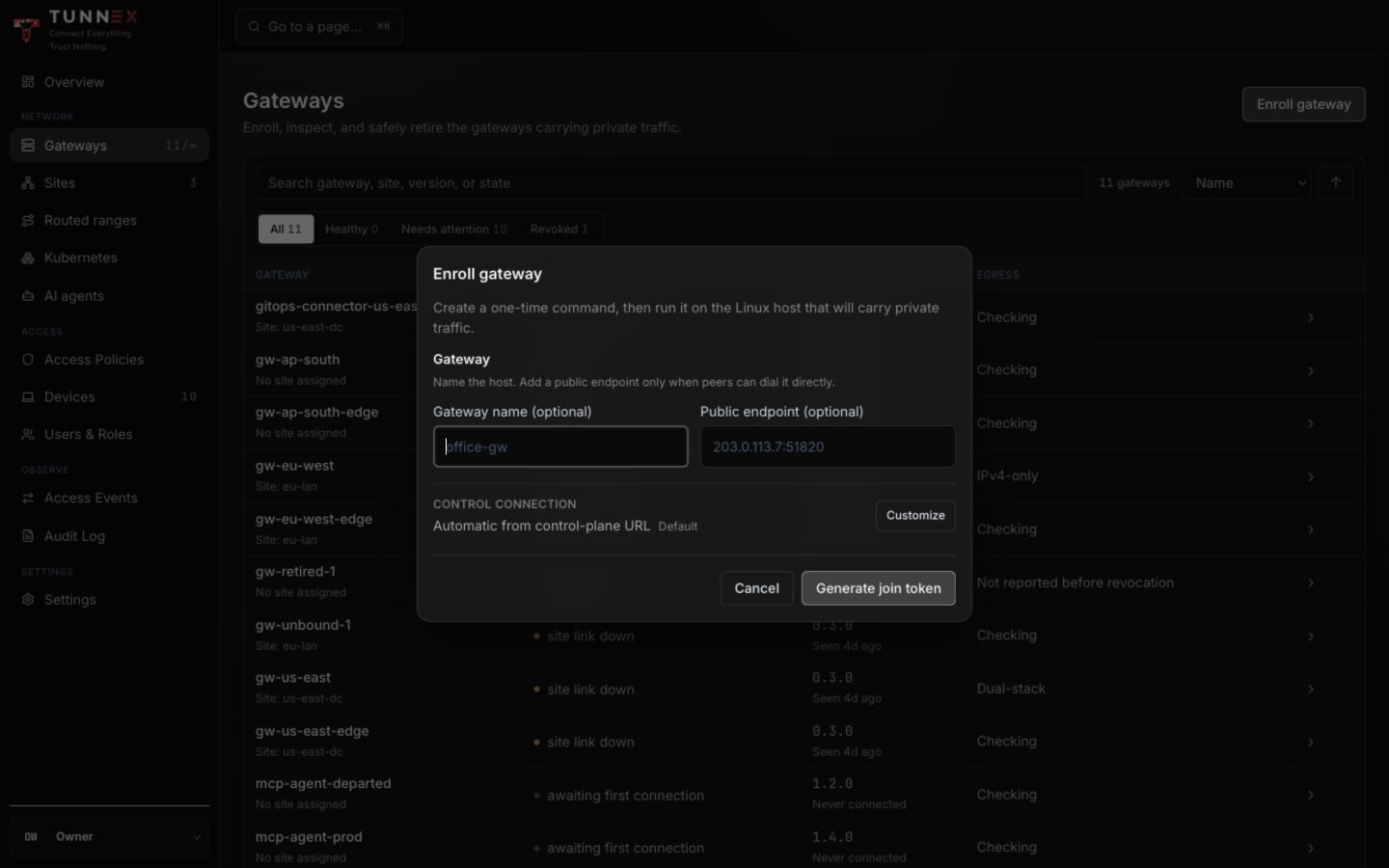
Enter the stable public WireGuard endpoint here. Open Customize only when the raw control endpoint differs from the public control-plane origin.
ssh -t -i "$SSH_KEY" "${ADMIN_USER}@${GW_PUBLIC_IP}" \ 'HISTFILE=/dev/null exec bash --noprofile --norc -i'# Paste the one-time command copied directly from the Tunnex console here.The release-generated command supplies the selected image, URLs, server name,
host networking, NET_ADMIN, /dev/net/tun, and a persistent Docker volume.
Do not translate it into a hand-written command. After redemption, close the
one-time command dialog and verify:
sudo docker ps --filter name=tunnex-nodesudo docker logs --tail=200 tunnex-nodesudo wg showContainer names can differ; use the name shown by docker ps. In the console,
the gateway must be active, Last seen must advance, and its runtime/version
must be present. That proves control connectivity, not public UDP reachability;
a real client handshake will prove the data plane later.
7. Create the private Nginx VM
Section titled “7. Create the private Nginx VM”This proof VM has no public IP. Its NSG explicitly allows HTTP from the Tunnex device pool. Adapt the NSG to your real application ports and policy.
az network nsg create \  --resource-group "$RG" \  --location "$LOCATION" \  --name "$APP_NSG" \  --output table
az network nsg rule create \  --resource-group "$RG" \  --nsg-name "$APP_NSG" \  --name AllowHttpFromTunnexDevices \  --priority 100 \  --direction Inbound \  --access Allow \  --protocol Tcp \  --source-address-prefixes "$DEVICE_POOL_CIDR" \  --source-port-ranges '*' \  --destination-address-prefixes '*' \  --destination-port-ranges 80 \  --output table
az network nic create \  --resource-group "$RG" \  --location "$LOCATION" \  --name "$APP_NIC" \  --vnet-name "$VNET" \  --subnet "$WORKLOAD_SUBNET" \  --network-security-group "$APP_NSG" \  --output table
az vm create \  --resource-group "$RG" \  --location "$LOCATION" \  --name "$APP_VM" \  --nics "$APP_NIC" \  --image Canonical:ubuntu-24_04-lts:server:latest \  --size Standard_B2s \  --admin-username "$ADMIN_USER" \  --ssh-key-values "$SSH_PUBLIC_KEY" \  --authentication-type ssh \  --os-disk-size-gb 30 \  --storage-sku Premium_LRS \  --output table
az vm run-command invoke \  --resource-group "$RG" \  --name "$APP_VM" \  --command-id RunShellScript \  --scripts \    'set -eu' \    'sudo apt-get update' \    'sudo apt-get install -y nginx' \    "printf '%s\n' 'tunnex azure private path ok' | sudo tee /var/www/html/index.html >/dev/null" \    'sudo systemctl enable --now nginx' \    'curl -fsS http://127.0.0.1/' \  --output jsonc
export APP_PRIVATE_IP="$(az network nic show \  --resource-group "$RG" --name "$APP_NIC" \  --query 'ipConfigurations[0].privateIPAddress' -o tsv)"
az vm list-ip-addresses \  --resource-group "$RG" \  --name "$APP_VM" \  --query '[].virtualMachine.network.{private:privateIpAddresses,public:publicIpAddresses}' \  -o jsonc
Expected result: Nginx returns tunnex azure private path ok locally and
publicIpAddresses is empty. Azure’s default AllowVNetInBound NSG rule still
permits normal VNet-internal administration unless you add a higher-priority
deny after all required allows; review the effective NSG instead of treating
this single rule as complete workload hardening.
8. Create the Tunnex site and route
Section titled “8. Create the Tunnex site and route”Follow Sites and LAN routing:
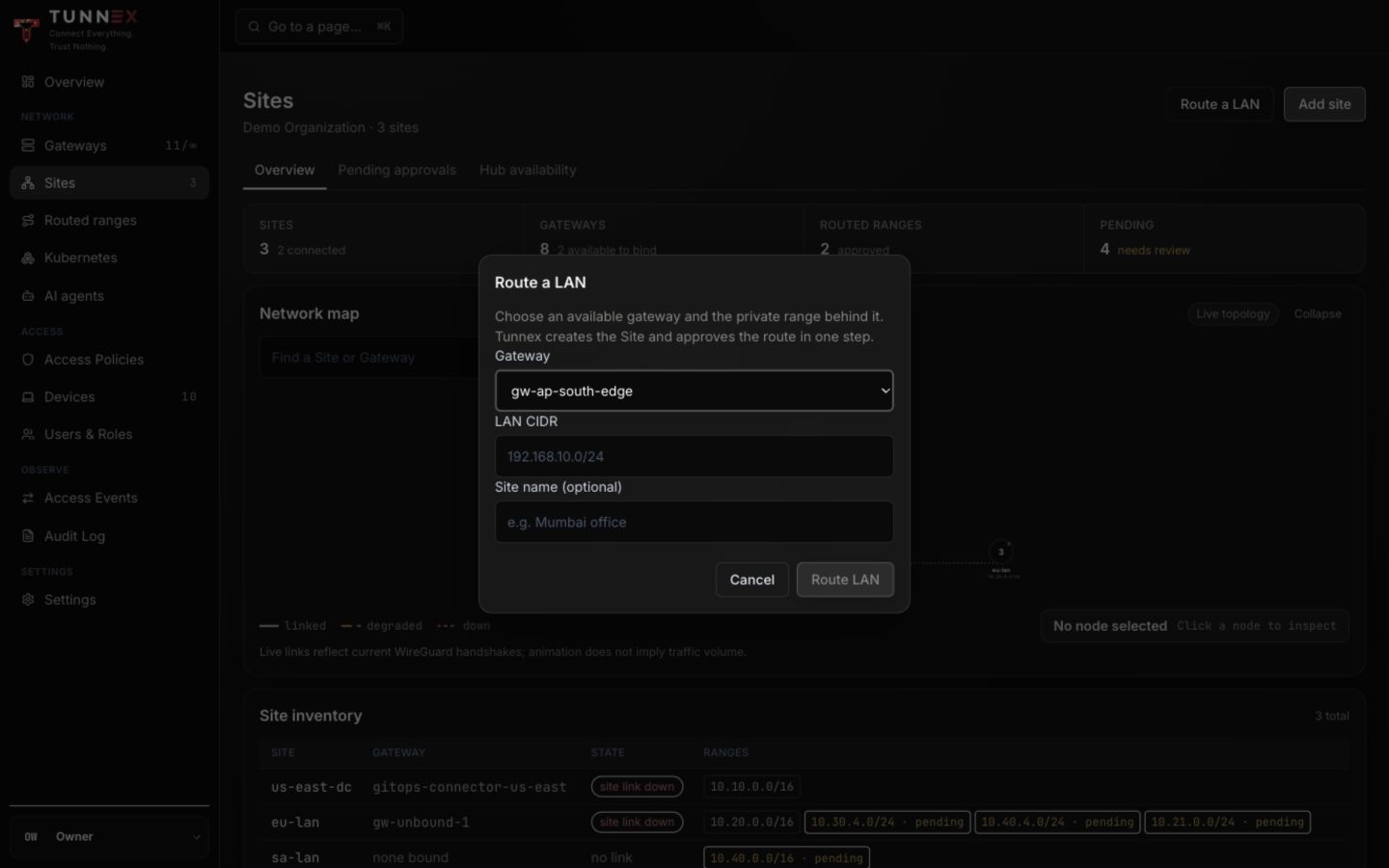
- Open Sites and select Route a LAN.
- Choose the new Azure gateway.
- Enter
10.42.10.0/24, the workload subnet—not the full VNet and not the gateway subnet. - Name the site
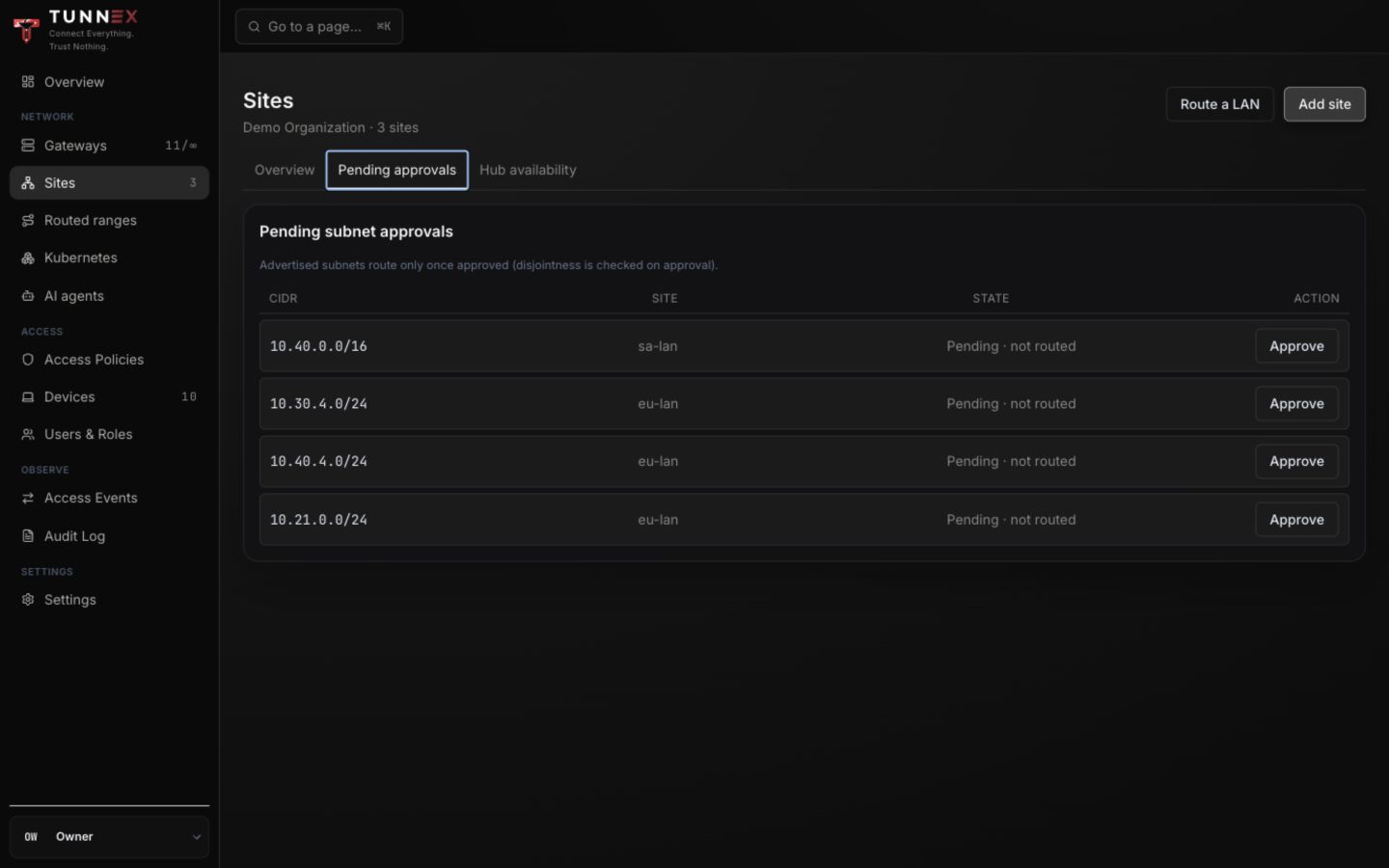
Azure eastus2and select Route LAN. - If using the explicit workflow, create the site, bind the gateway, advertise
10.42.10.0/24, then approve the pending range. - Confirm the approved range appears under Routed ranges and wait for the gateway to apply the new revision.
If policy enforcement is enabled, create the narrow resource and allow rule
before testing—for example, the private VM /32, TCP, port 80, assigned only
to the intended test group. Routing makes the destination reachable; it does
not grant access through a default-deny policy.
9. Add the Azure return UDR
Section titled “9. Add the Azure return UDR”Tunnex configures the gateway host, not Azure’s route tables. Without this UDR,
the private VM sends a reply for a device such as 10.99.0.7 to Azure’s default
route instead of back to the gateway.
Create a route for the exact live device pool, point it to the gateway’s private IP as a virtual appliance, and associate it only with the workload subnet:
az network route-table create \  --resource-group "$RG" \  --location "$LOCATION" \  --name "$RETURN_RT" \  --output table
az network route-table route create \  --resource-group "$RG" \  --route-table-name "$RETURN_RT" \  --name ReturnToTunnexDevices \  --address-prefix "$DEVICE_POOL_CIDR" \  --next-hop-type VirtualAppliance \  --next-hop-ip-address "$GW_PRIVATE_IP" \  --output table
az network vnet subnet update \  --resource-group "$RG" \  --vnet-name "$VNET" \  --name "$WORKLOAD_SUBNET" \  --route-table "$RETURN_RT" \  --output table
Do not point this route at the gateway public IP. A VirtualAppliance next hop
must be the routing NIC’s private IP.
Verify association and effective routes
Section titled “Verify association and effective routes”The private VM must be running for Azure to return its effective routes.
az network vnet subnet show \  --resource-group "$RG" \  --vnet-name "$VNET" \  --name "$WORKLOAD_SUBNET" \  --query '{prefix:addressPrefix,routeTable:routeTable.id}' -o jsonc
az network route-table route list \  --resource-group "$RG" \  --route-table-name "$RETURN_RT" \  --query '[].{name:name,prefix:addressPrefix,nextHop:nextHopType,nextHopIp:nextHopIpAddress}' \  -o table
az network nic show-effective-route-table \  --resource-group "$RG" \  --name "$APP_NIC" \  --output table
az network nic list-effective-nsg \  --resource-group "$RG" \  --name "$APP_NIC" \  --output jsonc
The effective-route output must contain the device-pool prefix with next-hop
type VirtualAppliance and next-hop IP 10.42.0.4. If the row is absent, wait
for Azure convergence, confirm the association, and check that the VM is
running.
For multiple workload subnets, associate a reviewed return route table with each subnet that must reply to Tunnex devices. If a subnet already has a route table, add the device-pool route to that table instead of replacing it.
10. Prove the private-IP path
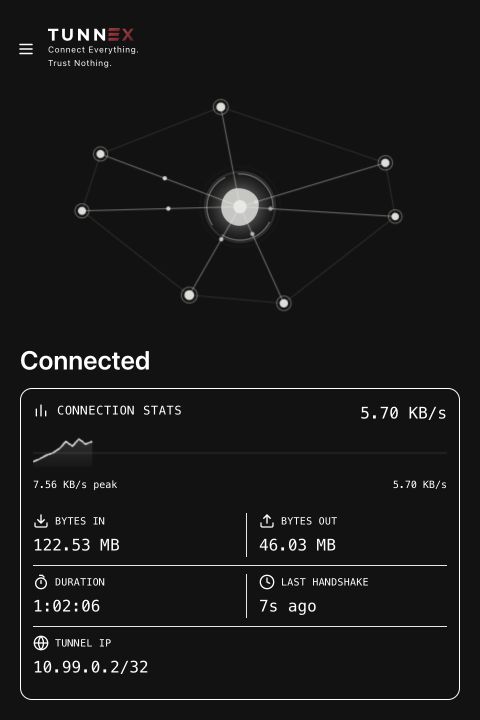
Section titled “10. Prove the private-IP path”Enroll and connect a managed macOS or Windows device using the
Desktop client. Wait for Connected and a recent
handshake. Copy the APP_PRIVATE_IP reported by Azure, then run from a macOS
terminal on that desktop:
export APP_PRIVATE_IP="10.42.10.4" # Replace if Azure reported another address.curl --fail --show-error --max-time 10 "http://${APP_PRIVATE_IP}/"Or from Windows PowerShell:
$AppPrivateIp = '10.42.10.4' # Replace if Azure reported another address.curl.exe --fail --show-error --max-time 10 "http://$AppPrivateIp/"Expected response:
tunnex azure private path okDo not use ping as the only proof. ICMP can be blocked while the application is healthy, and a WireGuard handshake alone does not prove the Azure return path. Verify all four layers:
- The desktop reports Connected and a recent handshake.
- The gateway’s
sudo wg showreports a recent peer handshake and increasing transfer counters. curlreturns the Nginx marker over the VM’s private IP.- Nginx records the request:
az vm run-command invoke \ --resource-group "$RG" \ --name "$APP_VM" \ --command-id RunShellScript \ --scripts 'sudo tail -n 20 /var/log/nginx/access.log' \ --output jsoncIf the handshake works but curl times out, inspect in this order: Tunnex site
approval and applied revision, access policy, gateway host forwarding, Azure
NIC IP forwarding, workload NSG, host firewall, UDR association, and the
private VM’s effective routes.
11. Add private DNS only after IP works
Section titled “11. Add private DNS only after IP works”Keep the private-IP proof as the baseline. This section adds an Azure Private DNS zone and an Azure DNS Private Resolver inbound endpoint. The endpoint is what a connected Tunnex device queries through the gateway; Azure’s VNet-local resolver address is not directly usable by a remote device.
Azure DNS Private Resolver is a paid Azure resource. Its endpoint needs a
dedicated, empty subnet delegated only to Microsoft.Network/dnsResolvers.
Azure permits /28 through /24; this walkthrough uses /28. Review the
current Azure DNS Private Resolver constraints and pricing
before creating it.
Create and link the private zone
Section titled “Create and link the private zone”Use a private subdomain you control, such as internal.example.com. Do not
create a public A record containing the private VM address, and do not delegate
this private zone from Cloudflare or another public DNS provider.
export VNET_ID="$(az network vnet show \  --resource-group "$RG" --name "$VNET" --query id -o tsv)"
az network private-dns zone create \  --resource-group "$RG" \  --name "$PRIVATE_ZONE" \  --output table
az network private-dns link vnet create \  --resource-group "$RG" \  --zone-name "$PRIVATE_ZONE" \  --name "link-${VNET}" \  --virtual-network "$VNET_ID" \  --registration-enabled false \  --output table
az network private-dns record-set a create \  --resource-group "$RG" \  --zone-name "$PRIVATE_ZONE" \  --name dev \  --ttl 60 \  --output table
az network private-dns record-set a add-record \  --resource-group "$RG" \  --zone-name "$PRIVATE_ZONE" \  --record-set-name dev \  --ipv4-address "$APP_PRIVATE_IP" \  --output table
The hostname in this example is dev.internal.example.com. Registration is
disabled deliberately: only records explicitly created in the zone are
published.
Create the inbound resolver endpoint
Section titled “Create the inbound resolver endpoint”The resolver subnet also needs the device-pool return UDR because query replies
for a client such as 10.99.0.7 must return through the gateway. Do not attach
this route table to the dedicated gateway subnet.
az network vnet subnet create \  --resource-group "$RG" \  --vnet-name "$VNET" \  --name "$DNS_SUBNET" \  --address-prefixes "$DNS_SUBNET_CIDR" \  --delegations Microsoft.Network/dnsResolvers \  --route-table "$RETURN_RT" \  --output table
export DNS_SUBNET_ID="$(az network vnet subnet show \  --resource-group "$RG" --vnet-name "$VNET" --name "$DNS_SUBNET" \  --query id -o tsv)"
az extension add --name dns-resolver --upgrade
az dns-resolver create \  --resource-group "$RG" \  --name "$DNS_RESOLVER" \  --location "$LOCATION" \  --id "$VNET_ID" \  --output table
az dns-resolver inbound-endpoint create \  --resource-group "$RG" \  --dns-resolver-name "$DNS_RESOLVER" \  --name "$DNS_INBOUND" \  --location "$LOCATION" \  --ip-configurations \    "[{private-ip-allocation-method:Dynamic,id:${DNS_SUBNET_ID}}]" \  --output table
export DNS_INBOUND_IP="$(az dns-resolver inbound-endpoint show \  --resource-group "$RG" \  --dns-resolver-name "$DNS_RESOLVER" \  --name "$DNS_INBOUND" \  --query 'ipConfigurations[0].privateIpAddress' -o tsv)"
test -n "$DNS_INBOUND_IP"printf 'Inbound DNS: %s\n' "$DNS_INBOUND_IP"
The dns-resolver command is an Azure CLI extension and currently requires
Azure CLI 2.75 or newer. If your managed shell cannot install the extension,
use Azure Portal or the documented ARM API instead of inventing a different DNS
path.
Prove Azure DNS before configuring Tunnex
Section titled “Prove Azure DNS before configuring Tunnex”Install dnsutils on the gateway if dig is absent, then test both transports
and the application from the gateway:
dig @"$DNS_INBOUND_IP" dev."$PRIVATE_ZONE" Adig +tcp @"$DNS_INBOUND_IP" dev."$PRIVATE_ZONE" Acurl --fail --show-error --max-time 10 "http://dev.${PRIVATE_ZONE}/"Both DNS commands must return APP_PRIVATE_IP, and curl must return the same
Nginx marker as the private-IP test. Stop here if either DNS transport fails.
Advertise DNS and activate the Tunnex profile
Section titled “Advertise DNS and activate the Tunnex profile”- Open Sites → your Azure Site → Advertise subnet.
- Enter the exact
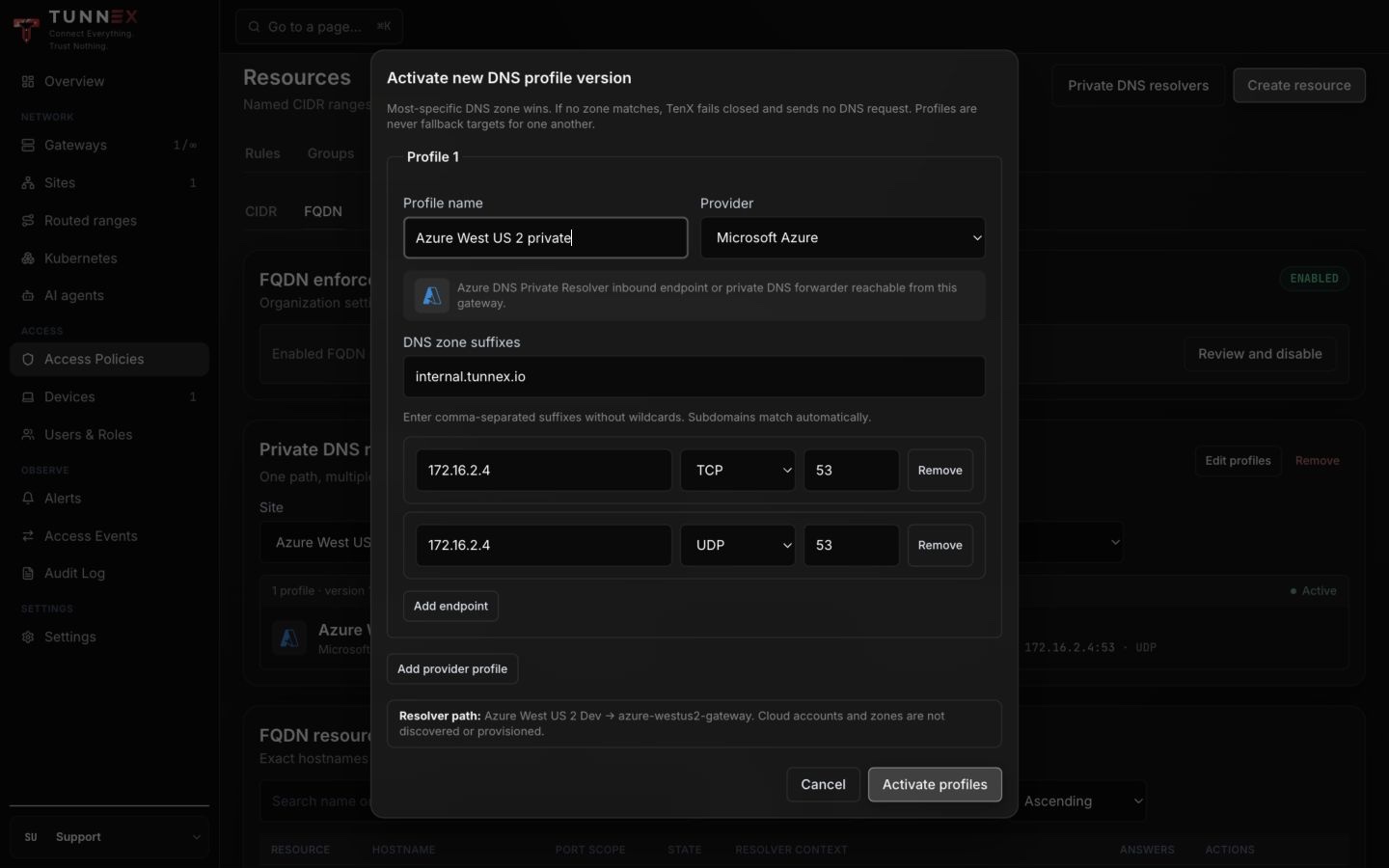
DNS_SUBNET_CIDR, select Advertise, open Pending approvals, and approve it. - Open Access Policies → Resources → FQDN.
- Under Private DNS resolvers, select the Azure Site and gateway, then choose Edit profiles.
- Enter a profile name, choose Microsoft Azure, enter
PRIVATE_ZONEas the suffix, and addDNS_INBOUND_IPtwice: UDP53and TCP53. - Select Activate profiles.
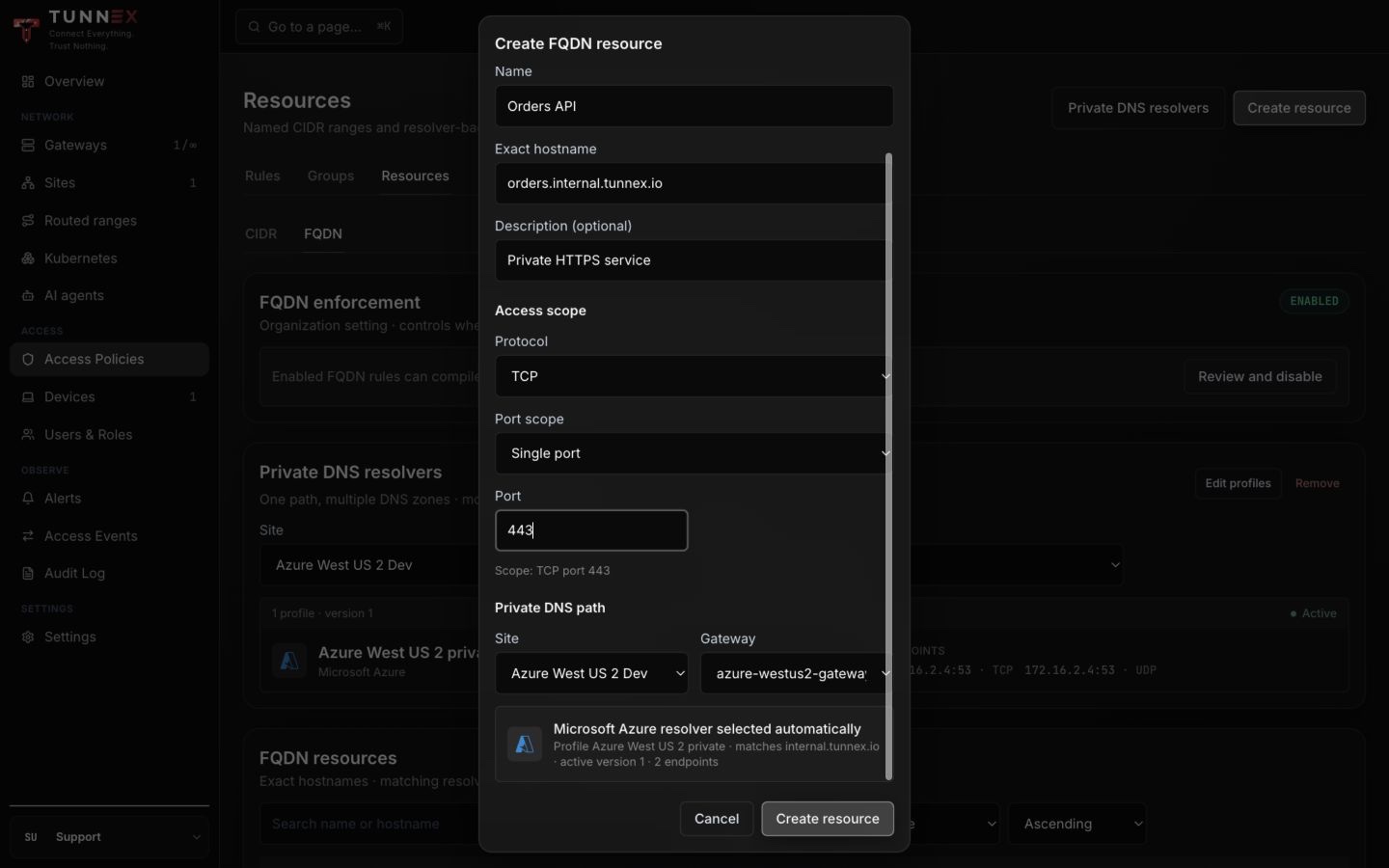
- Select Create resource → Create FQDN resource. Enter the exact hostname
dev.internal.example.com, choose TCP port80, and confirm the displayed resolver inheritance before creating it.
The inbound endpoint IP is stable for the lifetime of that endpoint but can change if the endpoint is deleted and recreated. Re-read it from Azure and activate a new Tunnex resolver-profile version after replacement.
Finish the policy and organization setting through FQDN access, end to
end. Then prove the route, private resolver, client
resolver projection, and application separately from the connected desktop.
On macOS, both private destinations must use a Tunnex utun interface:
route -n get "$APP_PRIVATE_IP"route -n get "$DNS_INBOUND_IP"
dig +short @"$DNS_INBOUND_IP" dev."$PRIVATE_ZONE" Adig +tcp +short @"$DNS_INBOUND_IP" dev."$PRIVATE_ZONE" A
dscacheutil -q host -a name dev."$PRIVATE_ZONE"curl --fail --show-error --max-time 10 http://dev.internal.example.com/
The first two DNS queries bypass operating-system resolver selection and prove
the Azure endpoint over UDP and TCP. dscacheutil and curl use macOS native
resolver selection and prove that Tunnex projected the suffix. Do not collapse
those into one test: a successful direct query does not prove client-side DNS
configuration.
The post-fix isolated Azure validation resolved dev.internal.tunnex.io to
172.16.0.4, routed that address over utun, and returned HTTP 200 by
hostname. Tunnex Desktop before v0.1.1 can create the macOS resolver file with
mode 0600; upgrade and reconnect so the helper installs it as readable mode
0644 instead of keeping a manual permission workaround.
DNS success does not grant traffic when policy enforcement is enabled. Create the narrow access rule for the FQDN resource separately.
Evidence capture checklist
Section titled “Evidence capture checklist”Capture only after every view has finished loading, and redact subscription, tenant, usernames, and public IPs when publishing outside the operations team:
- Azure VNet view showing the distinct gateway and workload subnet prefixes;
- Azure gateway NIC showing static private IP and IP forwarding enabled;
- Tunnex gateway details showing active lifecycle, last seen, and runtime;
- Tunnex site/routed-range view showing the approved workload subnet;
- Azure workload NIC effective routes showing the device-pool UDR;
- desktop Connected state with recent handshake; and
- terminal output showing the private-IP Nginx marker.
Never capture the generated enrollment command, join token, WireGuard private key, complete peer configuration, or unredacted diagnostic bundle.
Roll back safely
Section titled “Roll back safely”If adding the UDR breaks workload connectivity, detach it first. This restores Azure’s system routes without deleting the VMs:
az network vnet subnet update \  --resource-group "$RG" \  --vnet-name "$VNET" \  --name "$WORKLOAD_SUBNET" \  --route-table null \  --output table
az network vnet subnet show \  --resource-group "$RG" \  --vnet-name "$VNET" \  --name "$WORKLOAD_SUBNET" \  --query routeTable -o jsonc
Expected result is null. If the subnet originally used another route table,
reattach that original table instead of null.
For full teardown:
- Disconnect the test device.
- In Tunnex, remove the approved route/site binding, wait for reconciliation, move any homed devices, then revoke and remove the gateway.
- Confirm the resource group contains only the disposable resources from this guide.
- Delete the resource group:
az resource list --resource-group "$RG" --output tableaz group delete --name "$RG" --yes --no-waitResource-group deletion is irreversible and also deletes the VNet, both VMs, disks, NICs, public IP, NSGs, and route table in this example. Never run it if the group contains the control plane, shared networking, or another workload.